
DocsPress can publish several API documentation versions from one repository into one WordPress site. Versioning is opt-in: without versions-file, collection, synchronization, URLs, and reverse pull requests behave exactly as before.
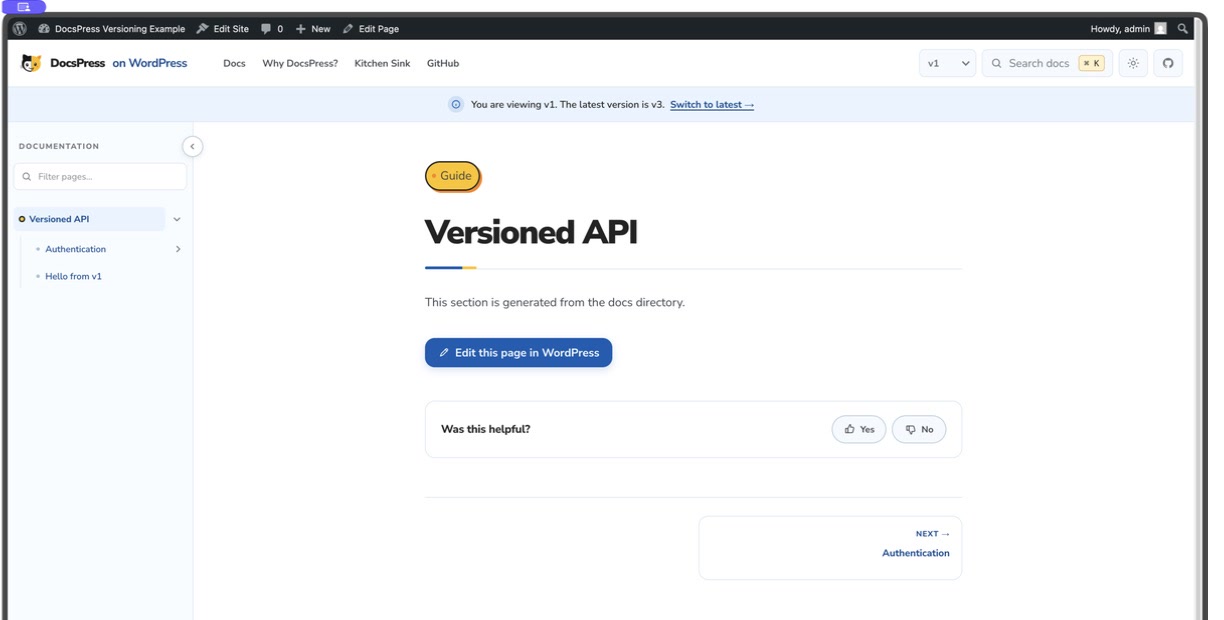
The example starts on a historical v1 Page so the version switcher and outdated-version notice are visible immediately. It also seeds v3 from root files, v2 from a directory, v1 from filename suffixes, missing counterparts, version metadata, and the Pages-screen filters.
Configure the version registry
Add a repository-relative JSON file and pass it to the Action. DocsPress uses the registry throughout collection, synchronization, public routing, and reverse pull requests.
-
Declare ordered releases
Name the repository latest version and map every active release to a root, directory, suffix, or manifest source.
-
Synchronize version data
DocsPress validates ownership, creates or updates version terms, then builds each release as a separate managed Page tree.
-
Serve the selected release
WordPress exposes the effective latest at clean URLs and historical releases below stable version prefixes.
- uses: Automattic/docspress@main with: wordpress-site: example.wordpress.com wordpress-access-token: ${{ secrets.WP_ACCESS_TOKEN }} docs-dir: docs versions-file: docs-versions.json status: draft delete-mode: trash dry-run: true-
Line 6
Versioning remains disabled until this input is present.
{ "latest": "v3", "versions": [ { "id": "v3", "label": "v3", "source": { "type": "root" } }, { "id": "v2", "label": "v2", "source": { "type": "directory", "path": "v2" } }, { "id": "v1", "label": "v1", "source": { "type": "suffix", "suffix": ".v1" } } ]}-
Line 2
The repository latest must name one configured version.
Entries are ordered for WordPress administration and the version switcher. IDs are lowercase URL-safe slugs. latest must name an entry. If a root source exists, it must be the repository latest version.
Version registry fields
-
lateststring required -
Version ID treated as the repository default latest release.
-
versions[].idstring required -
Lowercase URL-safe version identifier used in taxonomy terms and historical routes.
-
versions[].labelstring -
Reader-facing label. The ID is used when the label is omitted.
-
versions[].source.typeenum required -
How this version owns Markdown files.
-
versions[].source.pathstring -
Directory below docs-dir or repository-relative manifest path, depending on the source type.
-
versions[].source.suffixstring -
Filename marker removed before logical routes are calculated.
-
versions[].redirectsstring -
Repository-relative redirect manifest scoped to this version.
No fields match this filter.
Supported source layouts
The layouts can coexist. This example keeps the current v3 files at the root of docs/, v2 in a directory, and v1 in filename suffixes:
-
docs-versions.json -
docs/-
hello.md -
authentication/-
oauth.md -
api-keys.v1.md
-
-
v2/-
hello.md -
authentication/-
api-keys.md
-
-
-
{ "id": "v3", "label": "v3", "source": { "type": "root" }}{ "id": "v2", "label": "v2", "source": { "type": "directory", "path": "v2" }}{ "id": "v1", "label": "v1", "source": { "type": "suffix", "suffix": ".v1" }}{ "id": "v1", "source": { "type": "manifest", "path": "versions/v1/manifest.json" }, "redirects": "versions/v1/redirects.json"}Root latest
Root discovery uses unclaimed Markdown below docs-dir. Files claimed by a directory, suffix, or manifest version are excluded:
docs/hello.md -> v3 /hellodocs/authentication/oauth.md -> v3 /authentication/oauthRoot Markdown belongs to the configured latest ID. DocsPress does not create a separate Current term.
Version directories
Directory paths are relative to docs-dir:
docs/v2/hello.md -> v2 /hellodocs/v2/authentication/api-keys.md -> v2 /authentication/api-keysFilename suffixes
The suffix is removed before the logical route is calculated:
docs/hello.v1.md -> v1 /hellodocs/authentication/api-keys.v1.md -> v1 /authentication/api-keysPer-version manifests and redirects
A manifest path is repository-relative. Its Markdown sources are resolved relative to the manifest, exactly like the normal manifest-file format:
Redirect entries use logical routes within that version. A redirect from old to hello in v1 points to /docs/v1/hello/, not to the same route in another version.
WordPress data and administration
The DocsPress Blocks plugin is required when versions-file is enabled. Synchronization creates a REST-visible docspress_version taxonomy on Pages. Version terms record order, active state, repository-default latest, and effective latest; managed Pages retain the fields needed for routing and exact reverse synchronization.
Managed Page version data
-
_docspress_version_idstring required -
Taxonomy-aligned version ID for this Page.
-
_docspress_logical_routestring required -
Route shared by counterpart Pages across versions.
-
_docspress_page_identitystring required -
Stable identity combining version and logical route.
-
_docspress_source_typeenum required -
Source layout that owns the Page.
-
_docspress_source_pathstring required -
Exact Markdown destination used for reverse synchronization.
-
_docspress_docs_rootstring required -
Managed documentation root used to isolate routes and lookups.
No fields match this filter.
Version data stays attached through both directions
Removed versions become inactive instead of losing their taxonomy history. Pages follow delete-mode.
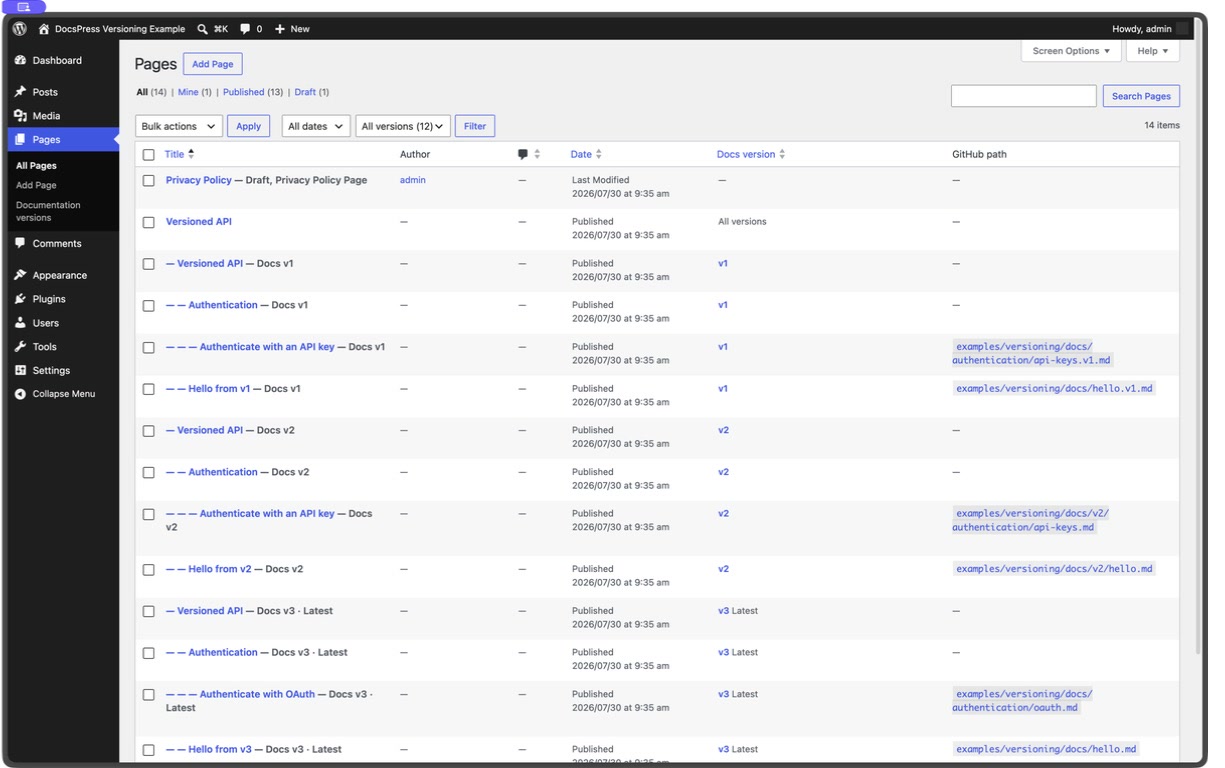
Pages remain stored below stable internal parents such as /docs/v1/authentication/api-keys/. On Pages → All Pages, the Docs version column is sortable, labels filter the list, Latest and Inactive states are visible, and the ordered dropdown includes All versions, Latest, and every known version with counts. When synchronized Pages include GitHub metadata, a GitHub path column links each exact repository-relative Markdown path to its configured repository and ref in a new tab; virtual containers and unrelated Pages display a dash. Managed Page assignment is read-only because synchronization owns it.
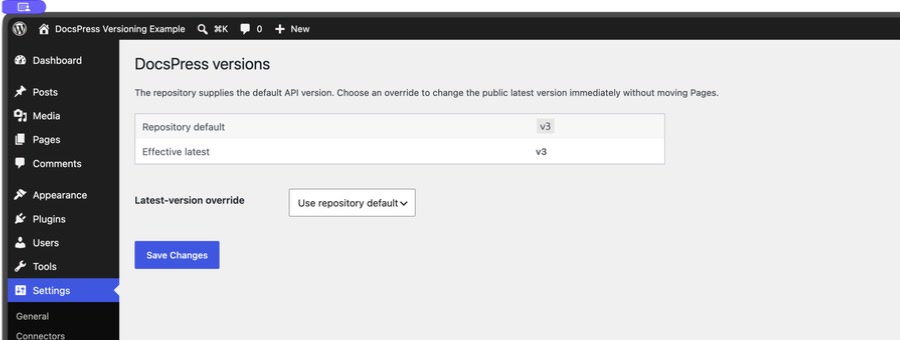
Use Settings → DocsPress to inspect the repository default and effective latest. An active administrator override wins; an invalid or inactive override falls back to the repository default. Changing the override updates routing immediately without renaming Pages.
Public routes
The effective latest version uses clean URLs while historical versions retain their version prefix:
/docs/hello//docs/authentication/oauth//docs/v2/hello//docs/v1/authentication/api-keys/The effective latest’s explicit prefix permanently redirects to the clean route. Canonical Page links, navigation, breadcrumbs, search, adjacent navigation, XML sitemaps, .md responses, and llms.txt use the same version context. llms.txt indexes the effective latest tree; historical .md URLs remain directly addressable.
The switcher matches Pages by logical route. If the selected version has no counterpart, it links to that version’s root and announces that the requested Page is unavailable.
The switcher never substitutes a same-route Page from another release. It opens the selected version root and exposes the unavailable-page state to the reader.
Version interface blocks
The bundled Header template places a compact Version Switcher dropdown immediately before Command Search. The Page template places the historical-version notice as a full-width status bar directly below the Header. They remain independent Site Editor blocks, so a site owner can move, remove, or restyle either one.
Customize the header switcher
Open Appearance → Editor → Design → Templates → Pages, select the Header, and choose Edit original. Select Version Switcher to configure its label, presentation, badges, single-version behavior, and missing-page wording. The block can remain immediately before Command Search or move anywhere the Header layout allows.
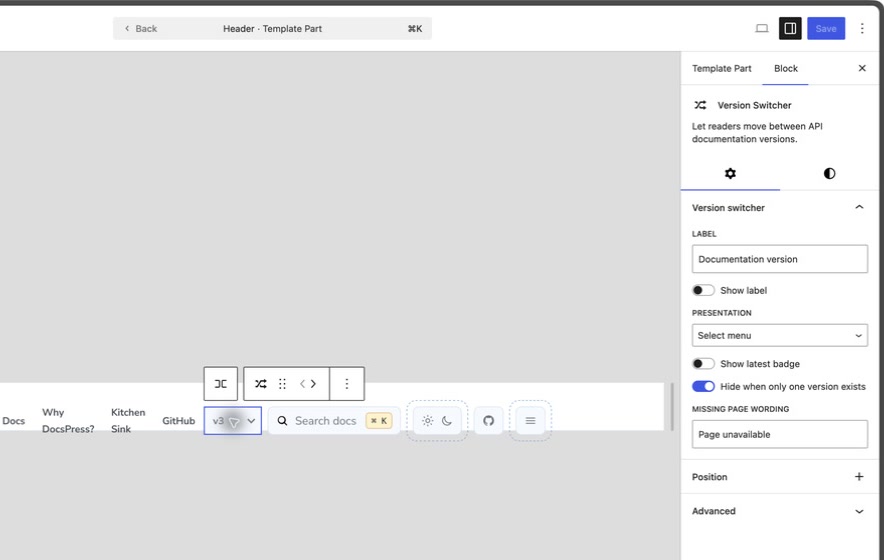
docspress/version-switcher supports:
- label text and visibility;
- select-menu or link-list presentation;
- latest badge visibility;
- hiding when only one version exists;
- missing-page wording.
Customize the historical-version notice
Return to the Pages template and select Version Notice to edit its message, latest-link label, icon, and dismissibility. The preview uses example version data so the bar remains editable even when the current Page is the latest version.
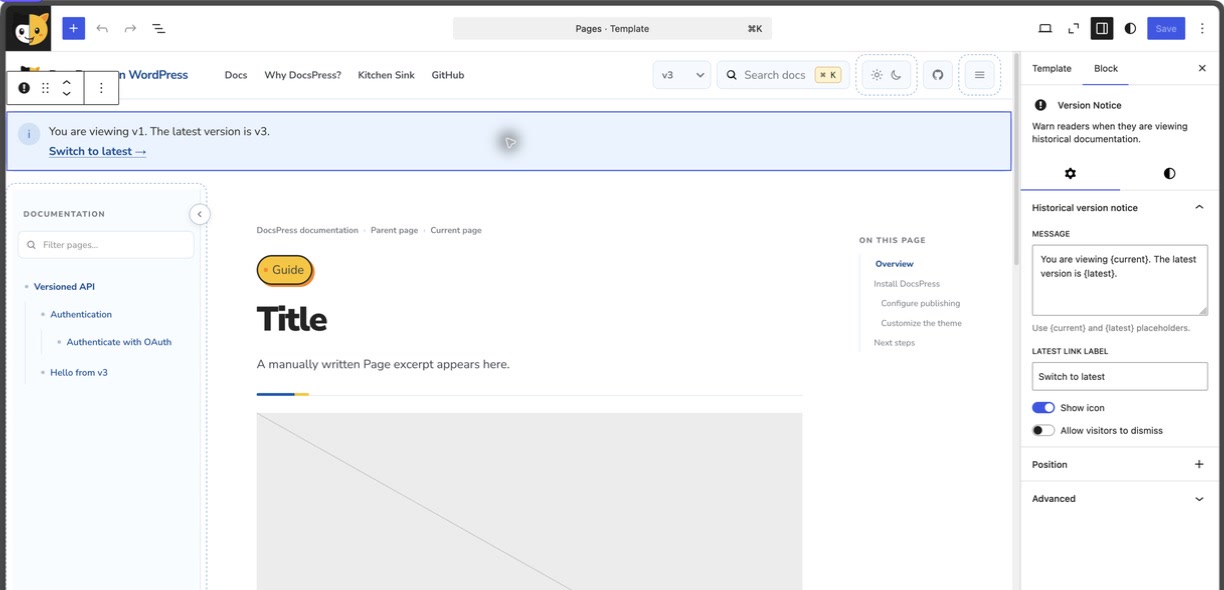
docspress/version-notice appears only on historical versions and supports:
- a message with safe
{current}and{latest}placeholders; - latest-link label;
- icon visibility;
- visitor dismissibility.
The Styles panel for either block exposes native colors and gradients, link color, typography, spacing and block gap, borders and radius, dimensions, sticky positioning, and shadow. Advanced controls include the anchor and custom classes. Full alignment plus the Version Notice block’s header-version-notice class creates the bundled bar; changing its alignment or removing that class returns the notice to its portable card treatment.
Both are API v3 server-rendered blocks. The DocsPress, WordPress.org, WordPress.com, and Jetpack style families provide complete component recipes while semantic theme tokens keep the blocks portable to another block theme.
Developers can customize resolved choices with docspress_version_switcher_choices, the notice text with docspress_version_notice_message, the effective latest ID with docspress_effective_latest_version, and generated destinations with docspress_version_target_url.
Reverse synchronization
The source path stored on each Page is authoritative. WordPress edits return to the exact file:
v3 /authentication/oauth -> docs/authentication/oauth.mdv2 /authentication/api-keys -> docs/v2/authentication/api-keys.mdv1 /authentication/api-keys -> docs/authentication/api-keys.v1.md-
Line 8
Filename-suffix ownership survives WordPress editing and pull-request generation.
Manifest-backed title changes update the owning manifest. Links are converted only against Pages in their stable version tree, so a v1 edit cannot silently target a same-route v2 file.
DocsPress maintains one rolling docspress/wordpress-sync pull request. One changed version uses docs(v1): sync changes from WordPress; multiple versions use docs(versions): sync N files from WordPress. The body groups exact paths under version headings and identifies the effective latest. pull-request-title remains an explicit override.
Migrating from Docusaurus
Docusaurus stores frozen releases in versioned_docs/version-[name]/, keeps an ordered versions.json, and normally serves its configured latest release at /docs/ while the working docs/ tree can appear at /docs/next/. Its version command copies the current docs tree and sidebar into versioned directories. Docusaurus also recommends file-path Markdown links so the build can resolve them within the correct version. See the Docusaurus versioning guide.
DocsPress can adopt copied Docusaurus trees with directory entries, or keep a repository’s existing suffix/manifests without forcing a copy-based release workflow. The important semantic difference is that DocsPress’s root source is the named repository latest version; a WordPress override can change the public effective latest without changing repository files. If a project needs a separately published unreleased next tree, model it as another explicit version source rather than an unnamed Current term.