
DocsPress converts familiar Markdown into editable Gutenberg-compatible content. In the other direction, it emits ordinary Markdown for portable core blocks and a readable, versioned Markdown envelope for blocks that need Gutenberg-only configuration.
One source, two native interfaces
The same committed file remains useful in both places. GitHub hides the lossless configuration comments and renders the visible GFM preview. WordPress reads that configuration, rebuilds native Gutenberg blocks, and applies the documentation theme. Reviewers do not have to decode serialized wp:* comments, and WordPress editors do not receive a flattened Markdown imitation.
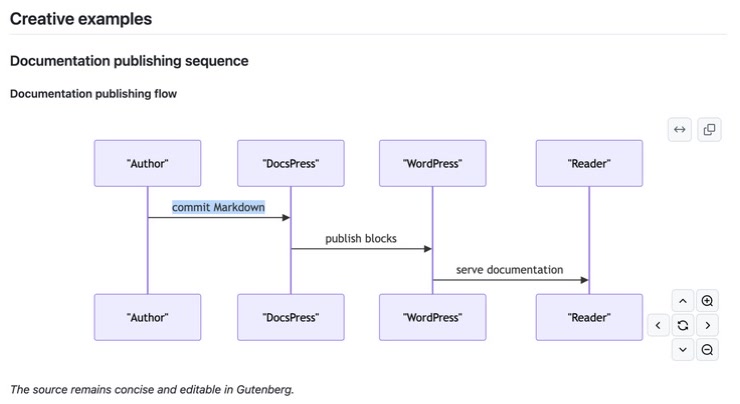
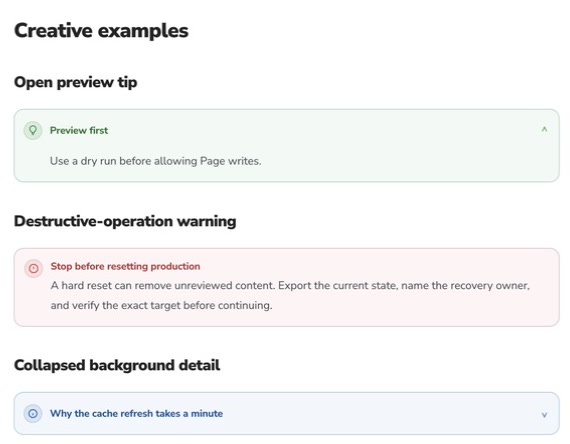
The cropped screenshots focus on two compatibility contracts: GitHub turns a DocsPress diagram envelope into a live Mermaid diagram; WordPress reconstructs callout envelopes as styled native blocks, including collapsible details. Each surface receives its strongest native presentation from the same readable Markdown source.
Core Markdown mapping
| Markdown | WordPress block |
|---|---|
| Paragraphs and inline formatting | core/paragraph |
| Headings | core/heading |
| Ordered, unordered, nested, and task lists | core/list |
| Blockquotes | core/quote |
| Fenced code | core/code |
| GFM tables | core/table |
| Images | core/image |
| Horizontal rules | core/separator |
| Raw HTML | core/html |
| Plain core paragraphs, headings, lists, quotes, code, images, tables, separators, and HTML | ordinary Markdown |
| Styled or structural core blocks | readable Markdown preview plus lossless hidden configuration |
| DocsPress blocks | block-specific Markdown preview plus versioned hidden configuration |
| Legacy serialized Gutenberg comments | accepted and normalized for backward compatibility |
Conversion algorithm
DocsPress applies the same deterministic algorithm in both directions:
- Parse frontmatter without reformatting it, then protect fenced code and inline code so example text is never interpreted as block syntax.
- Expand each
docspress:blockenvelope into exactly one validated Gutenberg block. The config is authoritative; the visible Markdown is its review-friendly projection. - Parse the remaining ordinary Markdown with GFM support and map each top-level node to a core block.
- On WordPress-to-GitHub runs, strip the synchronization marker and generated title or source-link blocks before comparing content.
- Normalize editor-only attributes and omitted default values, then fingerprint blocks by meaning rather than byte serialization.
- Use a longest-common-subsequence diff to change only the corresponding Markdown source regions. Insertions, deletions, and reordering never regenerate an unchanged region.
- Emit pure Markdown for losslessly portable core blocks. Emit semantic previews for all DocsPress blocks: callouts and results use blockquote alerts, API exchanges use separate request and response detail groups, code surfaces use fences, fields use tables, procedural flows use ordered lists, diagrams use GitHub-rendered Mermaid, and navigation or hero blocks use headings, links, and images.
- When a core block carries styling, nested layout, dynamic behavior, or another property Markdown cannot preserve, keep its exact serialized block inside hidden config and show its readable content outside the config.
- Fail before writing when a boundary is malformed, config is invalid, a lossless payload names the wrong block, or source regions cannot be mapped one-to-one.
Reverse synchronization
In propose and reconcile modes, DocsPress matches the live top-level Gutenberg blocks to the blocks generated from the current source. It applies a WordPress-only edit to the corresponding Markdown region and preserves every unchanged region exactly, including frontmatter formatting, blank lines, code-fence languages, and custom-block JSON.
WordPress may add editor-only attributes or omit attributes whose values equal a block default. DocsPress treats those serialization differences as equivalent. Plain core blocks return to ordinary Markdown. DocsPress blocks return to semantic Markdown envelopes, and core blocks with meaningful attributes or unsupported structure return to lossless envelopes instead of exposing raw wp:* comments.
If the source structure cannot be mapped safely to the live blocks, reverse synchronization stops with an error rather than rewriting the entire Markdown body.
Add screenshots and diagrams
A standalone Markdown image becomes a native core/image block. Write meaningful alternative text and add an optional quoted title when the image needs a visible caption:
DocsPress preserves the image URL; it does not upload repository files to the WordPress Media Library. Use a stable HTTPS URL, or upload the asset separately before synchronization. Follow the theme customization guide for the Site Editor workflow.
The DocsPress Diagram block keeps its compact relationship source in the hidden config and generates a fenced mermaid preview for GitHub. Flow diagrams become flowchart LR; sequence diagrams become sequenceDiagram. WordPress reconstructs its theme-native accessible SVG from the same config, so neither surface depends on the other surface's generated presentation.
Choose a DocsPress block
DocsPress: Colorful CodeOne example with a filename, highlighting, line numbers, caption, and copy.DocsPress: Code TabsEquivalent package-manager, language, platform, or API-client examples.DocsPress: Terminal SessionA copyable command separated from its observed output.- Use Callout for a note, tip, warning, danger, or success message.
- Use Hero for a fully editable WordPress homepage introduction; unlike documentation blocks, it intentionally exposes layout and color controls.
- Use Audience Paths to send readers into independent Page roots based on a useful starting state, such as publishing existing Markdown or creating documentation from source.
- Use API Request / Response to keep one verified HTTP exchange together.
- Use Result to summarize a verified outcome after a procedure.
- Use File Tree for relevant repository or generated structure.
- Use Prompt for a reusable AI prompt whose model, mode, context, and caption matter.
Read and edit block envelopes
The boundary comments and JSON config are hidden by normal Markdown renderers. The body between them is ordinary Markdown, so a callout remains a useful blockquote on GitHub:
<!-- docspress:block
{
  "version": 1,
  "name": "docspress/callout",
  "attrs": {
    "tone": "warning",
    "title": "Review before publishing",
    "content": "<p>Run the checks and inspect the diff.</p>",
    "collapsible": false
  }
}
-->
> [!WARNING]
>
> **Review before publishing**
>
> Run the checks and inspect the diff.
<!-- /docspress:block -->
The config is the lossless source of truth and the visible body is a generated Markdown projection for reviewers and renderers. Edit a DocsPress block in Gutenberg, or update its config and regenerate the preview together. Never change only the preview and expect that presentation-only edit to reach WordPress.
Legacy self-closing comments remain valid input:
<!-- wp:docspress/result {"status":"success","title":"Checks passed","content":"\u003cp\u003eThe examples match the source.\u003c/p\u003e","meta":"24 tests"} /-->Run npm run migrate:markdown-blocks once to replace legacy comments and editor-serialized core blocks across README.md and docs/. Fenced examples are left untouched.
Escape quotes, backslashes, control characters, and newlines within config strings. DocsPress additionally normalizes HTML-sensitive characters to Unicode escapes before synchronization. Do not add unsupported attributes. Documentation blocks use preset-owned semantic colors; Hero and Audience Paths accept only their documented presentation attributes.
See the complete block reference and Kitchen Sink.